Open the Nagad app
Log in to your Nagad account and tap the Bill Pay option.
Pay your Sunflower Life Insurance premium through the Nagad app by following this simple step-by-step guide.
Use the Nagad mobile app to submit your premium payment. Follow the instructions carefully and save the transaction receipt after successful payment.
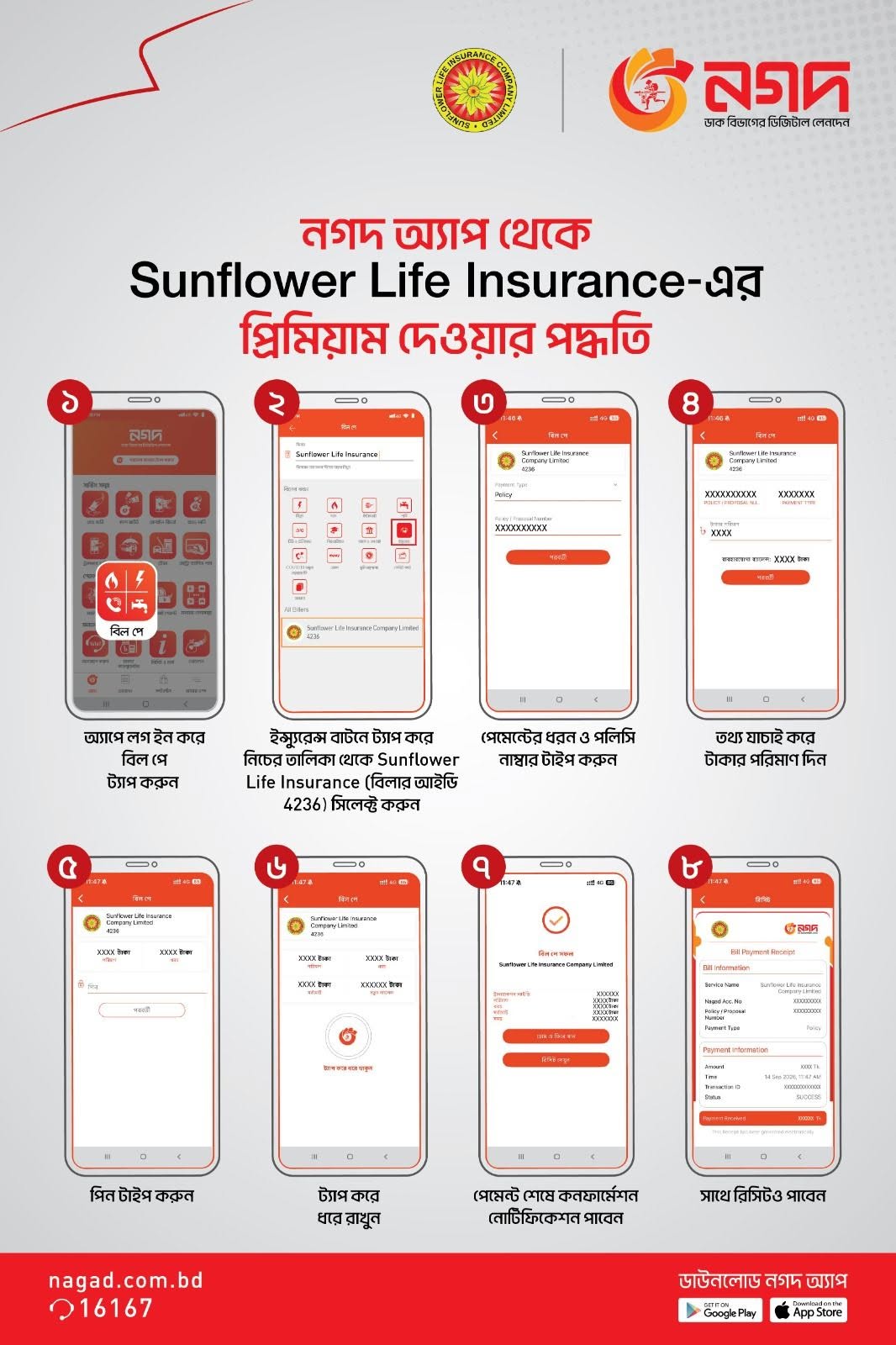
In the Nagad app, open Bill Pay, choose Insurance, and select Sunflower Life Insurance Company Limited from the biller list.
Follow these steps in the Nagad app to complete your premium payment.
Log in to your Nagad account and tap the Bill Pay option.
Choose Insurance from the available bill payment categories.
Select Sunflower Life Insurance Company Limited (Biller ID: 4236).
Select the payment type and enter your policy number as requested in the app.
Check the policy information and premium amount displayed before proceeding.
Enter your Nagad PIN and confirm the transaction in the app.
After successful payment, view and save the digital receipt for your records.
Watch this short video for a visual demonstration of the premium payment procedure.
Contact our team if you need assistance with your payment or policy information.
Contact customer support